Features

Blood Bank

Find blood donors in minutes.
Help save lives through quick and easy connection.

×

Accessing the Blood Bank

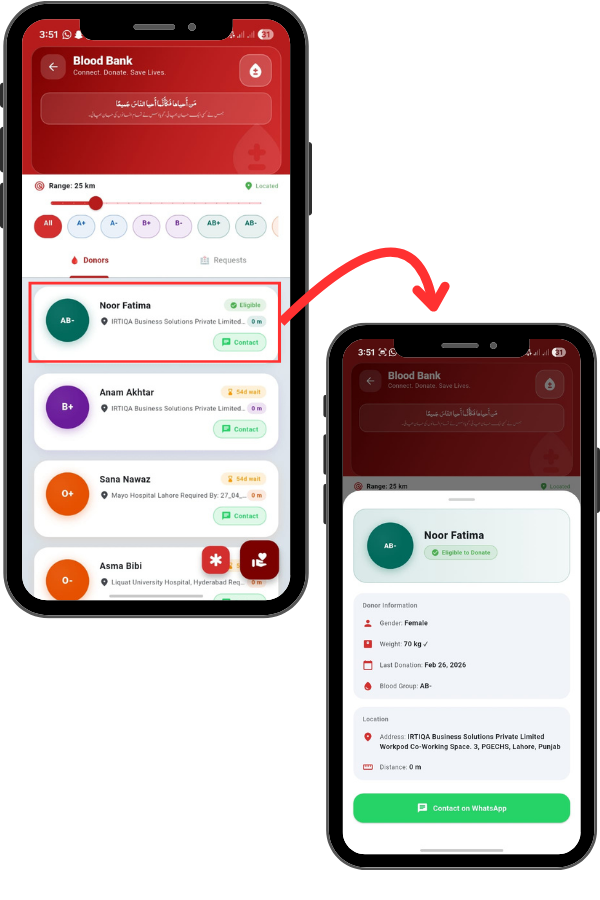
From the Main Menu, locate and tap the Blood Bank icon. This module connects donors with those in need to save lives. On the main dashboard, you can see a Range slider at the top.

You can adjust this to find donors within a specific distance, like 25 km or 65 km. Below that, there are buttons for every Blood Group (A+ , B-, O+ , etc.) to filter the list instantly.

You can toggle between the Donors tab and the Requests tab.

72
73

Viewing Donor Details

Tapping on a donor opens their detailed profile, where you can verify their eligibility status, check their last donation date, and view their exact address.
At the bottom, a large green button allows you to contact the donor directly on WhatsApp to easily coordinate the donation process.

Requesting Blood

If you want to become a donor, tap the Register button. You will need to fill in your Personal Info like Full Name, Blood Group, Gender, and Weight. Enter your WhatsApp number and Location. Crucially, you must check the WHO Health Declarations, confirming you don’t have infections and haven’t donated in the last 56 days.

74
75

Requesting Blood

If you are in need of blood, tap the Request Blood button. Select the Blood Group Needed and set the Urgency Level to Normal, Urgent, or Critical.

Enter the Patient Name, Hospital, and your WhatsApp number. Finally, set the location and the time required by, then submit the request to alert nearby donors.