Features

Eiman Trust

Test your knowledge with interactive quizzes. Improve learning in an engaging way.

×

Accessing Eiman Trust

From the Main Menu, scroll down to the “Eiman Social” section and tap on the Eiman Trust icon.

This module connects donors with verified charitable causes. On the main dashboard, you can get a clear overview of the current needs. The large circular graph displays the Total Amount Still Needed.

Below the graph, you can see:

  • Total Raised
  • Number of Donors
  • Active Cases

This ensures complete transparency about where the funds are being used.

51
52

Browsing Categories

Scroll down to the “Help by category” section. Causes are organized into sections like Education, Rashan (Food), Medical, Rent/Housing, and Emergency. Each card shows how many cases are open and the funding percentage. Tap any category to view specific cases.

Viewing Verified Cases

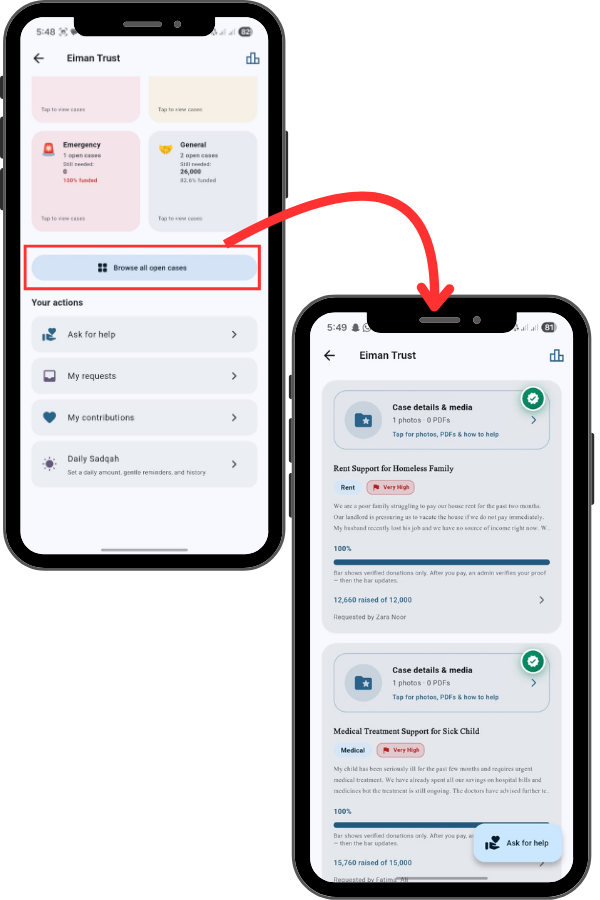
Tap on a category or the “Browse all open cases” button. Notice the Green Verification Badge on the top right of each case. This ensures the case is authentic. You can read the full description, see the Funding Progress Bar, and view uploaded photos or PDFs for proof.

53
54

Taking Action (Donate or Request)

Ask for Help: If you are in need, tap this to submit a request. My Contributions: Track the donations you have made. Daily Sadqah: Set up recurring daily charity reminders. My Requests: Monitor the status of any help you have requested.

Viewing the Donor Board

To see the top contributors and promote transparency, tap the Bar Chart icon in the top right corner. This opens the Donor Board.

55