Features
Qurbani Share
Join collective Qurbani with ease. A simple and transparent way to participate.
Accessing Qurbani Share
From the Main Menu, locate and tap the Qurbani Share icon. This tool helps you organize group sacrifices or find animals for purchase.
Tap the icon to open the dashboard.
Managing My Campaigns
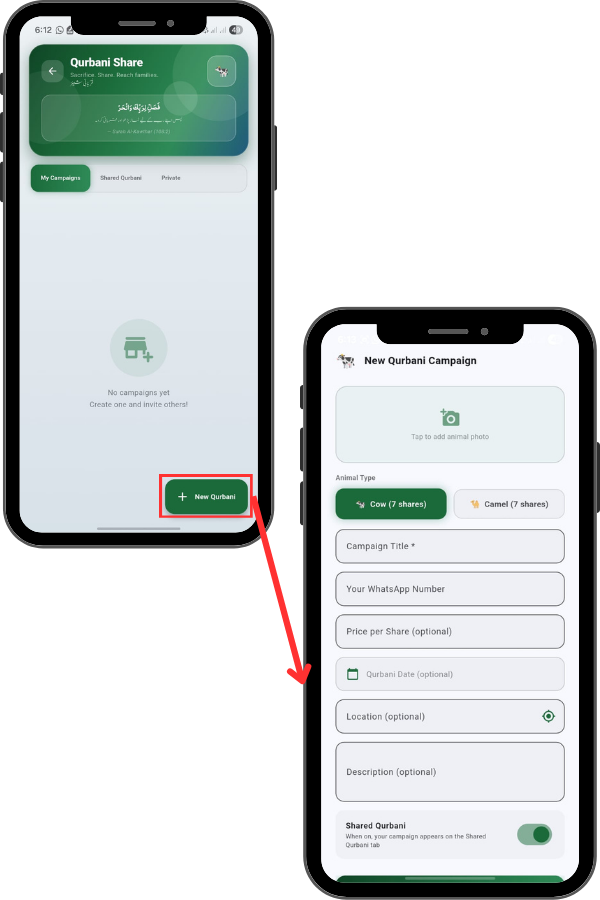
By default, you are on the ‘My Campaigns’ tab. This is where you can manage group sacrifices you have created. If you haven’t started one yet, it will show ‘No campaigns yet’.
To begin, tap the green ‘New Qurbani’ button at the bottom right to set up a new group. Fill in the details: Campaign Title: Give your campaign a name (e.g., ‘Dumba Qurbani Lahore’).
WhatsApp Number: Enter your contact number so interested people can reach you. Price per Share: Optionally set the cost for each share.
Date & Location: Set the Qurbani date and use the GPS icon to pin the exact location. Description: Add any extra details about the animal’s health or breed
Joining Shared Qurbani
To join an existing group, switch to the ‘Shared Qurbani’ tab. Here you will see a list of open campaigns like ‘Dumba Qurbani’ or ‘Buffalo Qurbani’. Each card shows the progress bar, price per share, and how many shares are remaining. Green buttons indicate the campaign is Open, while orange means it is Full.
Viewing Campaign Details & Seats
Tap on a campaign to see the details. You can see the total shares (e.g., 2/7 booked) and the price. A unique feature here is the ‘Share Seats’ visualization. It shows circles representing each share (1 to 7).
Green circles are Booked, and grey ones are Available, so you know exactly which share you are taking.
Browsing Private Listings (Marketplace)
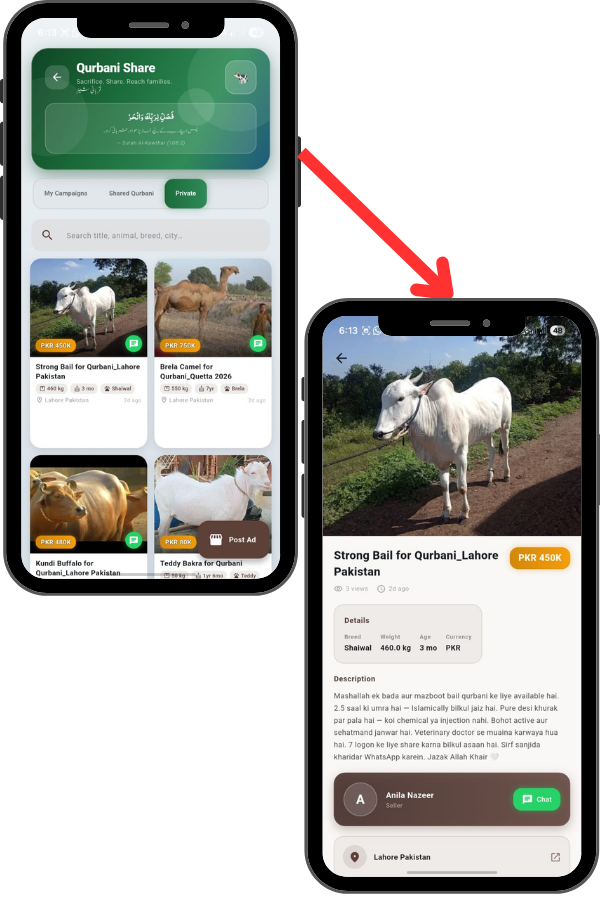
If you prefer to buy a whole animal instead of sharing, tap the ‘Private’ tab. This works like a marketplace. You can browse listings for Bulls, Camels, and Goats with photos, prices, and locations.
You can use the search bar to filter by city or breed.
Viewing Animal Details & Contacting Seller
Tap on a specific animal listing. You will see the Breed, Weight, Age, and a detailed description. If you are interested, there is a ‘Chat’ button at the bottom to contact the seller directly via WhatsApp or in-app messaging to finalize the deal.