Features

Marriage Bureau

Find a trusted and suitable match. Build meaningful connections with confidence.

×

Accessing Marriage Bureau

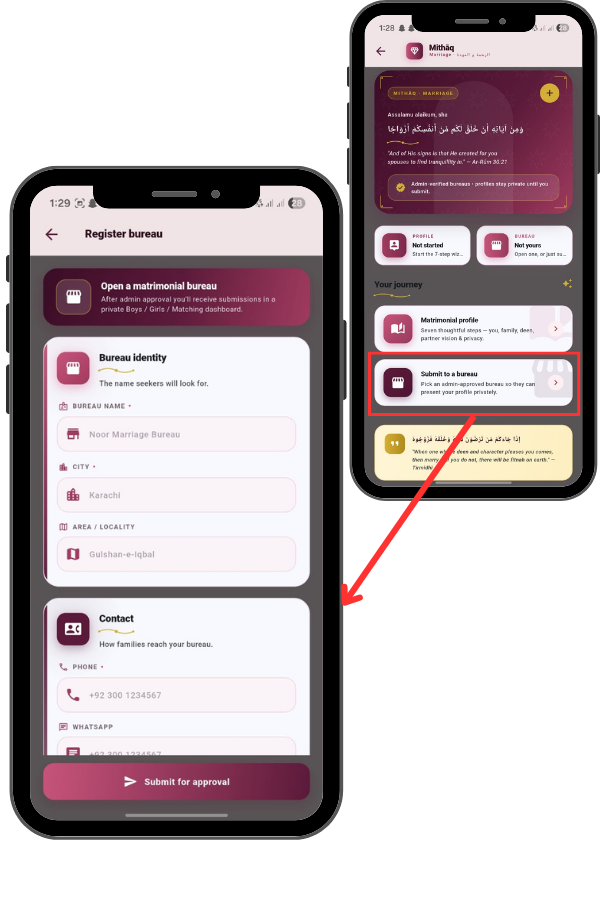
From the Main Menu, locate and tap the Marriage Bureau icon. On the main screen, you see two primary options: Profile for individuals seeking marriage, and Bureau for agencies.

Notice the privacy note: ‘Profiles stay private until you submit.’ This ensures your data is secure and only shared when you choose.

92
93

Creating a Matrimonial Profile (For Individuals)

Tap the “Profile” card or “Matrimonial profile” under ‘Your journey’. If you are looking for a spouse, tap ‘Matrimonial profile’. This launches a 7-step wizard. Step 1 is Basic Information. You will enter your Full Name, Gender, Date of Birth, Height, and Marital Status. The app guides you through 7 thoughtful steps covering your family, deen, and partner vision.

Registering a Bureau (For Agencies)

Tap the “Bureau” card or “Open a matrimonial bureau” . If you manage a marriage bureau, tap ‘Bureau’ . Select ‘Open a matrimonial bureau’ . You will need to fill in your Bureau Identity (Name, City, Area) and Contact details like phone and WhatsApp. Then, provide details ‘About your work’ , such as the established year and services offered. Finally, tap ‘Submit for approval’ to get verified by the admin.

94
95

Viewing Service Details

Once your personal profile is complete, go to ‘Submit to a bureau’. You can search for Admin-approved bureaus in your city. For example, you might find ‘Marriage Bureau’ in Lahore. Tap the ‘Submit’ button next to their name. This securely sends your profile to them so they can assist you with matching privately.”