Features
Eiman Guide
Get authentic answers from trusted sources.
Guidance you can rely on for daily life matters.
Accessing Eiman Guide
rom the Main Menu, scroll down to the “Eiman Social” section and tap on the Eiman Guide icon. This is a Q&A platform where you can browse questions answered by verified scholars.
Browsing Public Questions
Observe the “Public” tab (default view). Point to the list of questions. Here you can see questions asked by other users, categorized by topics like Aqeedah (Faith), Muamalat (Transactions), Ibadaat (Worship), and Family. Each question shows a blue checkmark, indicating it has been Answered by a scholar
Tracking Your Own Questions
Tap the “My questions” tab at the top. it will say ‘No questions yet’ , but once you submit a question, this is where you will see its status and the scholar’s response.
Asking a Question
Tap the blue “Ask” button (floating action button) at the bottom right. You need to provide a Short title, select a Category, and Describe your question in detail. You have two powerful options here: Voice Note: Instead of typing, tap the microphone to record your question verbally. Private Question: Toggle this switch if you want the answer to be visible only to you. If left off, your question and the answer will be published publicly to help others.
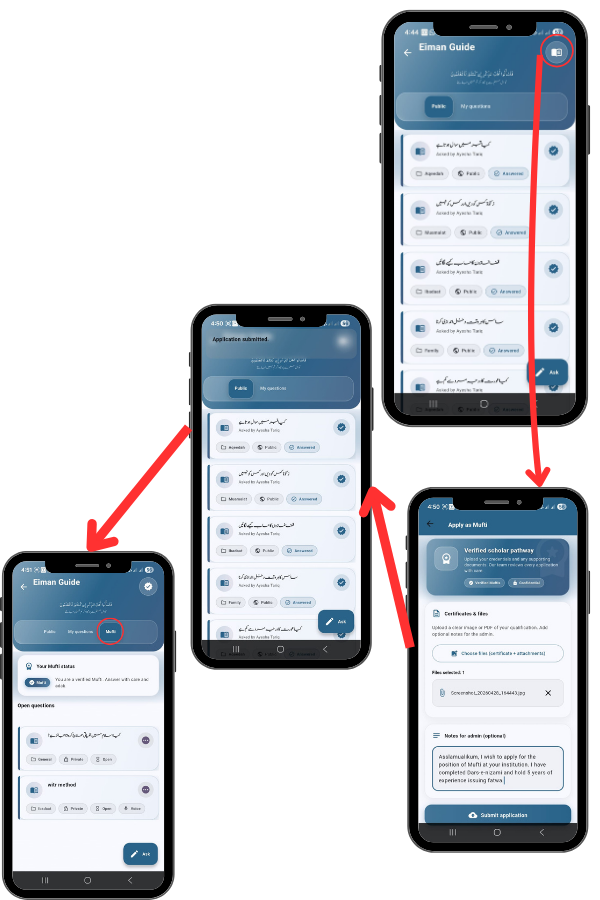
Applying as a Scholar (Mufti)
For qualified scholars, there is also an ‘Apply as Mufti’ section. You can upload your Certificates & files (like Dars-e-Nizami degrees) and submit an application to become a verified answerer on the platform, helping the community with your knowledge. Once your scholar application is approved by the admin, a new tab labeled ‘Mufti’ will appear at the top right of the Eiman Guide screen. Tap on this tab to access your scholar dashboard.