Features
Eiman Basics
Learn the fundamentals of Islam بسهولة.
Understand core beliefs in a simple and clear way.
Accessing Eiman Basics
From the Main Menu, scroll down to the “Quick Access” section
and tap on the Eiman Basics icon.
This section is designed for beginners and children to learn the
essential practices of Islam.
Learning Wudu (Ablution)
Tap on Wudu steps.
This opens a comprehensive visual guide. You will
see a step-by-step list, starting with Intention and
Bismillah. Each step includes an illustration, the
Arabic text, the English translation, and a Speaker
icon so you can listen to the pronunciation.
Learning Namaz (Prayer)
Go back and tap on Namaz steps.
This screen provides a Salah Guide with audio
and language options (Arabic & Urdu). Below, you
will see a Daily Rak’at chart. This helpful table
breaks down the number of Rak’ats for each
prayer (Fajr, Dhuhr, Asr, etc.) categorized into
Sunnah, Farz, Nafl, and Witr.
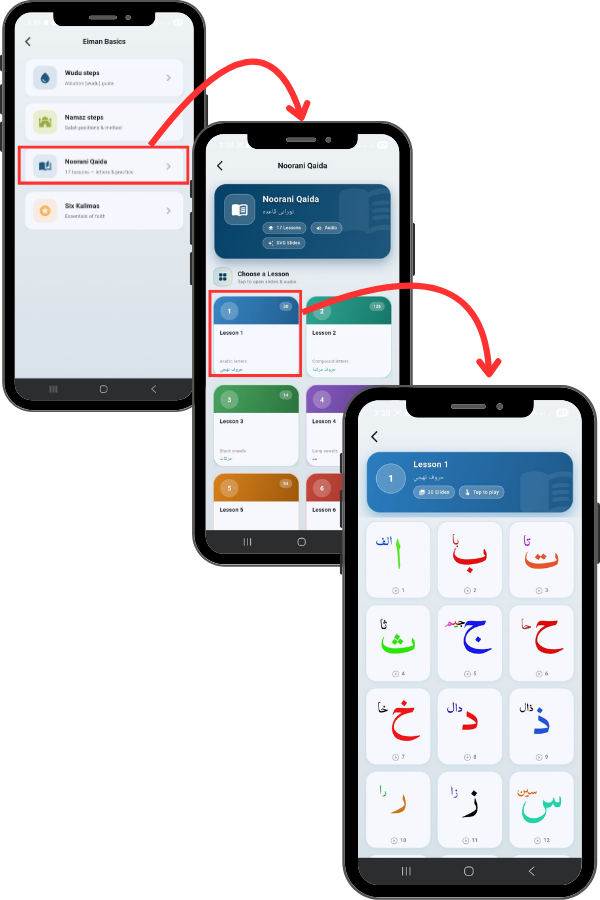
Studying Noorani Qaida
Go back and tap on Noorani Qaida.
This module features 17 Lessons ranging from
basic letters to compound letters and vowels. You
can enable Audio and SVG Slides for a better
learning experience.
Tap on any Lesson.
Here you will see the Arabic alphabet displayed in
a colorful grid, such as Alif, Ba, and Ta. Each
letter card has a small Play button. Tap it to hear
the correct pronunciation of the letter, making it
perfect for children or new learners to practice
their recitation.
Studying Six Kalimahs
Go back to the Eiman Basics menu and tap on
Six Kalimahs.
This section is dedicated to the six fundamental
declarations of Islamic faith.
Below it, you can tap the Translation button to
read the meaning in English, or tap the Urdu
button to see the translation in Urdu script. This
helps in understanding the meaning while you
recite.
Tap the right arrow or swipe left to see the
Second Kalima.