Features

Hadith

Access authentic Hadith easily with Eiman. A complete system for knowledge, understanding, and practice.

×

Accessing Hadith Books

From the Main Menu, tap on the “Hadith” icon in the Quick Access section.
You will see a list of major Sunni Hadith collections, such as Sahih al Bukhari, Sahih Muslim, Sunan Abu Dawood, etc. You can use the search
bar at the top to find a specific book.

12
13

Selecting a Book & Viewing Chapters

Tap on “Sahih al-Bukhari”
You are taken to the book’s index. You will see a list of Chapters
(Kitabs) written in Urdu (e.g., Wahi ka Bayan, Iman ka Bayan). Each
chapter shows the number of Hadiths it contains. There is also a
search bar to find specific chapters.

Customizing Reading Settings

Tap the Gear Icon (Settings) in the top right
corner of the screen
This opens the Settings menu where you can
personalize your reading experience:
General: Toggle Show/Hide for Arabic, Urdu,
or English text.
Arabic Font: Adjust the font size (e.g., 24) and
see a preview.
Urdu Font: Adjust font size (e.g., 22) and
change the Font Color (e.g., Red) to
distinguish it from the Arabic text.

14
15

Viewing Hadiths in a Chapter

Go back and tap on the first chapter,
وحي کا بیان 1.”
” (Wahi ka
Bayan – Revelation).
You will see a list of individual Hadiths within that chapter,
numbered 1, 2, 3, etc., with their titles in Urdu.

Reading a Specific Hadith

Tap on “1” (the first Hadith).
This opens the detailed view:
Top Bar: You have options to Play Audio (recitation), Share, or
Bookmark the Hadith.
Content: You will see the full Arabic text (in green/black) followed
by the Urdu Translation (in blue/brown) below it. You can scroll
down to read the full explanation.

16
17

Customizing Reading Settings

Tap the Gear Icon (Settings) in the top right
corner of the screen
This opens the Settings menu where you can
personalize your reading experience:
General: Toggle Show/Hide for Arabic, Urdu,
or English text.
Arabic Font: Adjust the font size (e.g., 24) and
see a preview.
Urdu Font: Adjust font size (e.g., 22) and
change the Font Color (e.g., Red) to
distinguish it from the Arabic text.

Listening to the Hadith (Audio Feature)

Tap the Play button (triangle icon) at the top.
If you prefer listening, tap the Play button. A menu will pop up
asking you to ‘Select Language to Play’. You can choose to
listen to the recitation in Arabic, the translation in Urdu, or
even English. This is great for learning the correct
pronunciation and understanding the meaning
simultaneously.

18
19

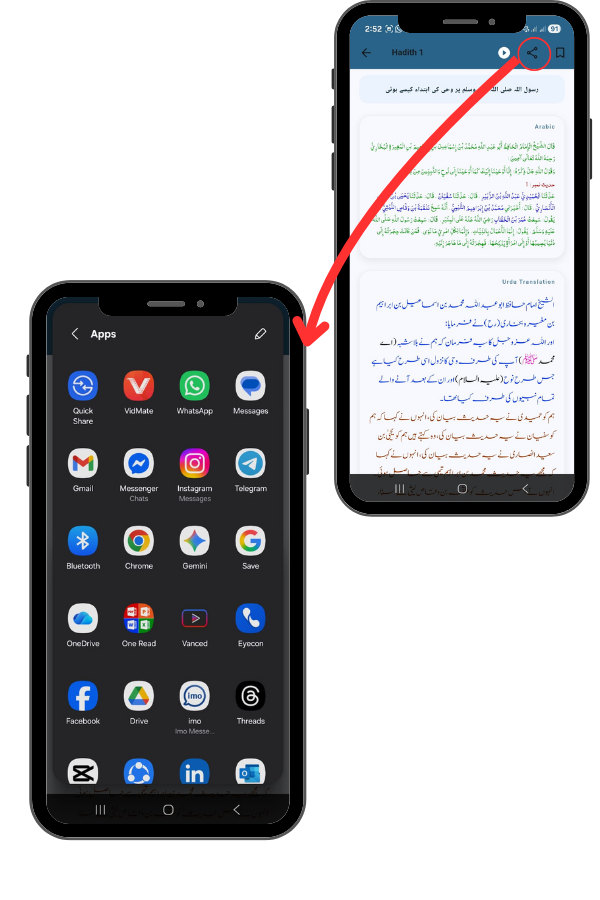
Sharing the Hadith

Tap the Share icon (next to the play button).
If you come across a Hadith you want to share with friends or family,
simply tap the Share icon. This opens your phone’s sharing menu,
allowing you to send the text or image directly to WhatsApp, Facebook,
Instagram, Email, or any other app installed on your device.